Astro-Cavern
A downloadable game
Amstrad CPC 6128 / Plus (Recommended) or CPC 464 (with DDI-1)
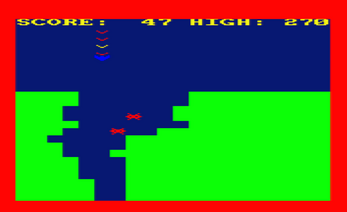
Pilot your high-speed Astro-Ship deep into the treacherous caverns of a distant world. Dodge the jagged rock walls and avoid the deadly space mines scattered in your path. The deeper you go, the cavern dynamically breathes, shrinking the tunnel down to 1-character gaps while the gameplay progressively speeds up.
When the Red Alert border flashes, you are in the Danger Zone! Surviving in these claustrophobic bottlenecks multiplies your score by 5x per frame. Can you beat your High Score?
This game was written for the BASIC 10 Liner competition 2026, in the PUR-120 category meaning it has 10 lines of BASIC at no longer than 120 characters per line. You can also see my game on their page here: https://bunsen.itch.io/astro-cavern-amstrad-cpc-by-virtualjames
CONTROLS:
O - Left
P - Right
E - Up
D - Down
To ensure maximum compatibility across the Amstrad CPC family, this game includes two different codebases on the disk:
1. "ASTRO.BAS" (v1.1): The recommended version. Optimized for the CPC 6128 and 464 Plus. It takes advantage of Locomotive BASIC 1.1 commands, using FRAME for screen syncing and COPYCHR$ for efficient string-based collision detection.
2. "ASTRO1.BAS" (v1.0): Fully Locomotive BASIC 1.0 compliant. Runs natively on an original CPC 464. It substitutes missing commands by using CALL &BD19 for hardware flyback syncing and pixel coordinate math (TEST) for collision detection.
Download
Install instructions
For CPC 6128 / Plus (Recommended - Version 1.1):
1. Mount the provided astro.dsk file into your emulator.
2. Type: RUN "ASTRO" and press ENTER.
3. If using a real 6128 you would simply insert the disc and type RUN "ASTRO"
For native CPC 464 (Version 1.0):
To run a .dsk file on a standard CPC 464, you must use a disk interface (like a Gotek/DDI-1 to 6 on real hardware, or AMSDOS in an emulator).
In WinAPE:
1. Go to Settings -> Memory. Under "Upper ROMs", set Slot 7 to "AMSDOS.ROM" and click OK.
2. Press F9 (or File -> Reset) to reboot the virtual Amstrad and initialise the drive.
3. Insert the astro.dsk file into Drive A.
4. Type: |disc (The '|' symbol is usually typed with Shift + @) and press ENTER.
5. Type: RUN "ASTRO1" and press ENTER.
Leave a comment
Log in with itch.io to leave a comment.